
Automated Appointment Reminder Calls with AI
No-show rates by industry, timing strategy, and two-way confirm and reschedule flows.
Utkarsh Mohan•Mar 31, 2026
A practical playbook for automated patient reminder calls in clinics, dental practices, and therapy practices: the script line by line, when to place each call, what never to say on a call or voicemail, how to handle someone other than the patient answering, and the TCPA and HIPAA points to clear before launch.
Utkarsh Mohan
Published: Nov 8, 2026
Most practices already send appointment reminders. Most of those reminders are a text the night before, sent from a number the patient does not recognise, that can be confirmed but not changed. The patient who cannot make it does nothing, the slot sits empty, and the front desk finds out when nobody walks in.
Automated patient reminder calls fix the part texts cannot: the patient can say they need a different day, and the call can move the booking there and then. This guide is about the patient-specific side of that, where the rules differ from a salon or a car service. If you want the product overview first, Ringlyn's automated appointment reminder calls page covers how the calls are placed and logged, and the voice and SMS reminders guide covers channel choice.
An automated patient reminder call is an outbound call, placed by software, that tells a patient about an upcoming appointment and records their answer. There are two kinds in use. The older kind plays a recording and asks the patient to press 1 to confirm or 2 to cancel. The newer kind is a conversational voice agent: the patient talks to it, and it can confirm, cancel, or offer another time from the practice's schedule.
The difference matters most for the patients you most need to reach. A patient who is going to attend will confirm through any channel. The patient who is unsure, or who needs a later time, is the one who either ignores the text or presses 2 and leaves an empty slot. A conversational call is the only automated option that turns that patient into a rescheduled appointment rather than a cancellation.
| Text reminder | Recorded call (press 1) | Conversational patient reminder call | |
|---|---|---|---|
| Patient can confirm | Yes | Yes | Yes |
| Patient can cancel | Usually | Yes | Yes |
| Patient can move the appointment | Rarely, via a link | No | Yes, on the call |
| Handles a question such as parking or fasting | No | No | Yes, from the practice's notes |
| Checks who answered before giving details | No | No | Yes |
| Writes the outcome back to the schedule | Sometimes | Sometimes | Yes |
Three ways to remind patients, compared on what the patient can do in response
A reminder for a haircut can say anything. A reminder for a medical visit is a disclosure. The fact that someone has an appointment at an oncology clinic, a fertility practice, or a substance-use program is itself sensitive, and the call may be answered by a partner, a parent, or a colleague holding the patient's phone.
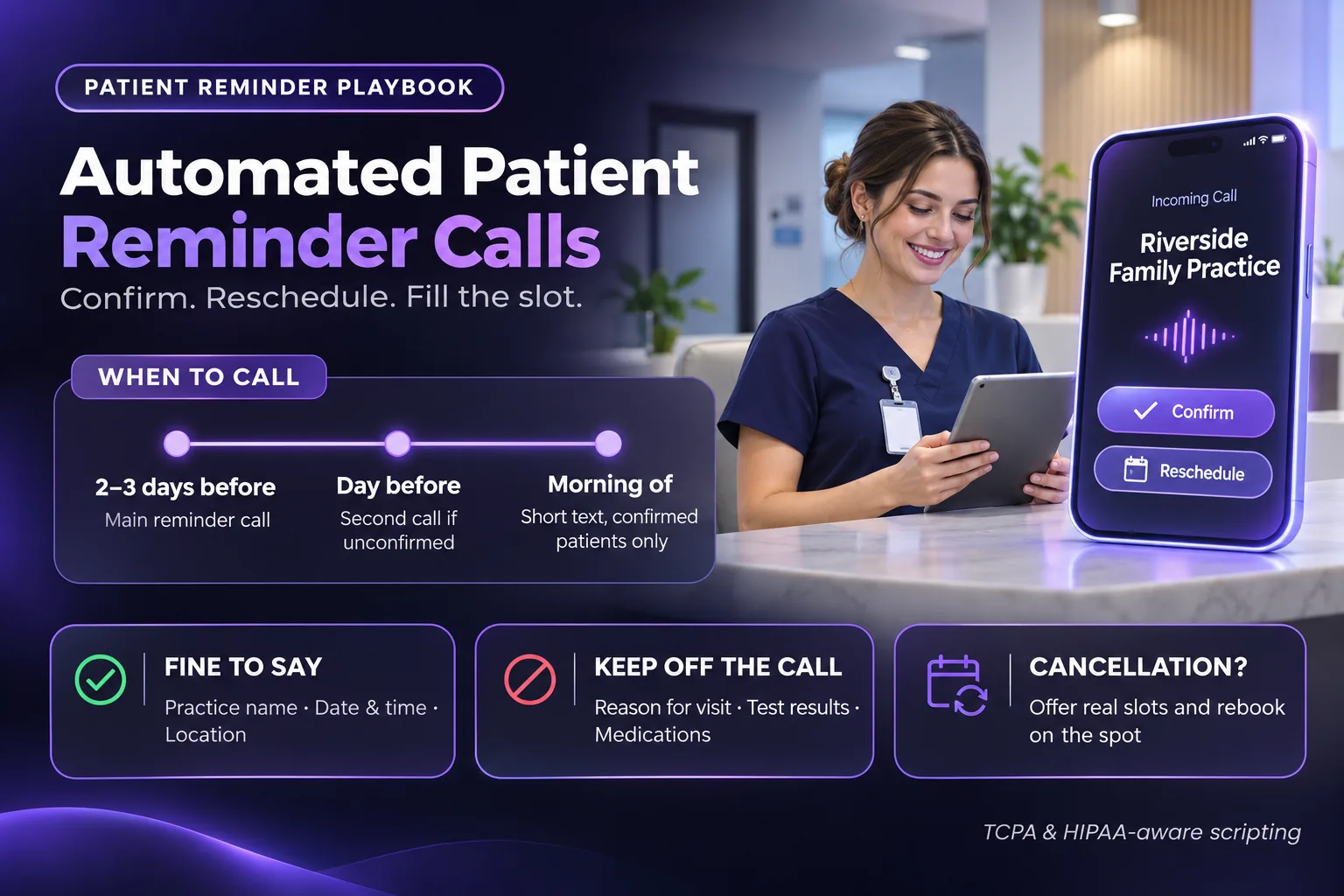
So a patient reminder script is built around the minimum. It has to say who is calling, when the appointment is, and how to confirm or change it. It should not say what the appointment is for, what was found last time, or which clinician the patient is seeing if that clinician's specialty gives the reason away. Every other line in the script is there to check identity, handle the answer, or close the call politely.
Timing decides whether a cancelled slot can be used again. A cancellation at 8am on the day is almost always a lost hour; a cancellation two days out can usually be filled from a waitlist. Most practices settle on three touches.
Adjust for the visit. New-patient appointments and long procedures justify an earlier first call, because they are harder to refill and the patient may need to bring paperwork or fast. Short follow-ups can drop to two touches. Whatever you choose, place calls inside sensible hours in the patient's own time zone, and stop calling once you have an answer.
This is the shape Ringlyn's patient reminder calls follow. The wording is yours to change, but the order is deliberate: identify the practice, confirm the person, give the minimum, take the answer.
Two details make a large difference to how the call sounds. Dates and times must be read the way a person would say them, so "Thursday the 14th at 10:30 in the morning" and not "11/14 10:30". And the agent should accept loose answers such as "probably" or "can I do later", rather than forcing the patient into a yes or no.
The rule is that the call carries the logistics and nothing clinical. That covers the live conversation and, more strictly, voicemail, which can be played back by anyone with access to the phone.
| Fine to say | Keep off the call | Keep off voicemail |
|---|---|---|
| Practice name and callback number | Reason for the visit or procedure | Anything beyond name, callback number and a request to call |
| Day, date and time | Test results or findings | The appointment time, if your policy is strict |
| Location or entrance | Medication names | The clinician's name, where it reveals a specialty |
| What to bring, in general terms | Outstanding balances, unless that is a separate billing call | Instructions specific to a condition |
A conservative default for patient reminder content; agree the final version with your compliance lead
A safe voicemail is short: "Hi, this is the scheduling team at Riverside Family Practice calling for Maria. Please call us back on 555-0100 about your upcoming appointment. Thank you." Many practices also send a text after a missed call, so the patient can confirm without calling back. The same minimum applies there.
This is the case that catches most scripts out. A parent answers a 17-year-old's phone, a spouse picks up the family landline, or a caregiver manages an older patient's appointments. Each of those people may or may not be someone the patient has authorised.
The safe default is that the agent gives no appointment detail to anyone who is not the patient. It asks whether the patient is available, and if not, asks for the patient to call the practice back, then ends the call. Where your records already list an authorised contact, such as a parent for a minor or a named caregiver, the agent can treat that person as the patient for scheduling purposes, which is a rule you set per patient rather than one the agent decides on the call.
A reminder program that only collects cancellations has done half the job. The value is in what happens to the slot next. When a patient cancels or moves on the call, the freed time should go straight to whoever is waiting for an earlier appointment.
Recall is the reminder for an appointment that has not been booked yet: the six-month hygiene visit, the next session in a physical therapy plan of care, the annual physical, or the follow-up after a new prescription. These calls are often worth more than appointment reminders, because a patient who drifts out of recall is a patient who may not come back at all.
The same agent handles them on a longer cycle. It calls patients who are due, offers times, and books the visit, with the same identity check and the same minimum disclosure. For dental practices the AI voice agent for dental offices guide covers recall in more depth, and for rehab clinics the chiropractic and physical therapy guide covers plan-of-care rebooking.
This section is a checklist for a conversation with your compliance lead or counsel, not legal advice. The rules below are the ones that most often come up for patient reminder calls in the United States.
For the outbound-calling rules in more detail, the TCPA compliance guide for AI voice agents covers consent records, quiet hours, and opt-out handling.
Published no-show rates vary from single digits to 30% or more depending on the specialty, the patient population, and how far ahead visits are booked, so your own baseline is the only one that matters. Take four weeks of no-show and late-cancellation data before you turn reminders on, then compare the same measures after.
| Measure | What it tells you |
|---|---|
| No-show rate by appointment type | Whether reminders are reaching the visits that matter most |
| Share of patients reached by voice | Whether call timing and caller ID are working |
| Reschedules taken on the call | Appointments saved that a text would have lost |
| Cancelled slots refilled | The revenue the program is recovering |
| Calls escalated to the front desk | Whether the script covers the questions patients actually ask |
| Opt-outs per hundred patients | Whether you are calling too often |
The six numbers to review weekly in the first month
Here is an illustrative example, with assumptions you should replace with your own. A practice books 300 visits a week with a 10% no-show rate, so 30 empty slots. If reminder calls move half of those patients into a reschedule or an early cancellation, and the waitlist refills two-thirds of the freed slots, that is 10 more completed visits a week. Multiply by your average visit value to see what the program is worth.
Ringlyn's automated appointment reminder calls confirm, cancel, and reschedule on the call and write the outcome back to your schedule.
Automated patient reminder calls work when they say the minimum, check who they are talking to, and can move the appointment on the call. Place the first call two to three days out so cancellations can be refilled, keep voicemail to a name and a number, run recall on the same agent, and clear the HIPAA and TCPA points before launch. Then measure against your own baseline, not someone else's average. The automated appointment reminder calls page shows how Ringlyn runs it, and the healthcare use case covers the rest of the practice phone line.
Automated patient reminder calls are outbound calls placed by software to remind a patient of an upcoming appointment and record their answer. Conversational versions let the patient confirm, cancel, or move the appointment on the call, and write the result back to the practice schedule.
Most practices call two to three days before the appointment, call again the day before for anyone who has not confirmed, and send a short text on the morning of the visit. The early call matters most, because a cancellation two days out can usually be refilled from a waitlist.
Keep it to the practice name, who the call is for, a callback number, and a request to call back about an upcoming appointment. Leave out the reason for the visit, the clinician's specialty, and any results, because voicemail can be heard by anyone with access to the phone.
Appointment reminders are a normal part of treatment and operations, and HHS guidance allows leaving limited messages for patients. The vendor placing the calls handles protected health information for you, so it needs a signed business associate agreement. Review the script with your compliance lead before launch.
The FCC has exempted certain healthcare calls to mobile numbers, including appointment reminders, from the usual prior consent requirement, subject to conditions on content, frequency, and opt-out. Confirm the current conditions with counsel, honour any opt-out the patient gives, and keep marketing out of reminder calls.
Yes. Recall uses the same agent on a longer cycle: it calls patients who are due for a hygiene visit, plan-of-care session, or annual check, offers times, and books the appointment, with the same identity check and minimum disclosure as a reminder call.
No-show rates by industry, timing strategy, and two-way confirm and reschedule flows.
Channel choice, DNC compliance, and why a conversational reminder that reschedules beats a one-way notification.
New-patient intake, plan-of-care rebooking, and no-show recovery for rehab clinics.